
999nb Game APK Download (Latest V2026 for Android)
11/16/2026
16MB
V5.2
666hH Game

Description
999nb Game details
| Developer | CW773 Game |
| Updated | Just Now |
| Size | 16MB |
| Version | v5.2 |
| Requirements | Android 5+ |
999nb Game App is a new-age Android gaming application that is gaining popularity among users in search of user-friendly gaming experience. With increasing availability of various games on different platforms, users are now curious about trying out the 999nb app with regard to its features, installation, registration, gameplay, security, and reliability.
This detailed guide covers all about the 999nb gaming application. It covers its features, installation on Android phones, registration process, login process, user interface, games available, how to use the app, security measures, and FAQs.
Since 999nb game is a recently launched platform, it might have some updates and modifications going ahead. Hence, it is suggested to check the updated information before using the app, you can easily visit on
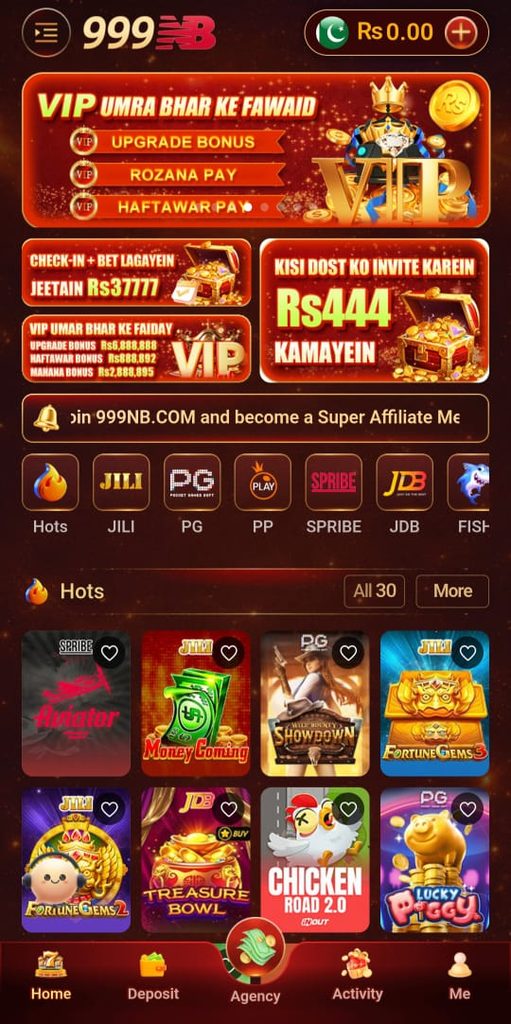
What Is 999nb?
999nb is an Android gaming application discussed as a mobile entertainment platform. It is designed for users interested in accessing gaming features through their smartphones.
Like other Android applications, its actual functionality depends on the installed version and the features made available by its developer.
New users should become familiar with the application before using it. Checking the available games, account requirements, navigation, and privacy information can help them understand what to expect.
Key Features of 999nb Game App
When exploring a new gaming application, users generally look for simple navigation, smooth performance, and convenient access to available features.
Here are some important areas to explore in 999nb:
User-Friendly Interface
An easy-to-understand interface makes it simpler for users to navigate an application. Clear menus, accessible options, and organized sections can improve the overall experience.
Gaming Categories
The available game selection is an important factor when evaluating a gaming platform. Users should explore the categories provided in the current version to understand which options are available.
Account Access
If registration is required, users can access account-related features through the application’s designated registration and login sections.
Android Compatibility
Application performance can vary depending on the smartphone’s Android version, available storage, memory, and hardware specifications.
Application Updates
Updates may introduce interface improvements, bug fixes, compatibility changes, and additional features. Users should check for updates through verified distribution channels.
Note: Specific features should be confirmed through the application’s latest official information.
How to Download 999nb Game APK on Android
If 999nb is distributed through an APK file, Android users may need to follow a manual installation process.
Before downloading, make sure the source is trustworthy and the file is compatible with your smartphone.
Follow these general steps:
- Locate a verified source that provides the 999nb APK.
- Check the application version and developer information.
- Review the file details before downloading.
- Download the APK to your Android device.
- Open the downloaded file.
- Follow Android’s installation instructions if the file passes your security checks.
- Open the application after installation.
Avoid downloading APK files from unknown websites or clicking suspicious advertisements. If an official app store version is available, consider using that option instead.
How to Install 999nb game on an Android Phone
Installing an APK is generally straightforward, but Android may display additional security notifications.
If you choose to install an APK manually, follow the instructions displayed by your device.
Depending on your Android version, you may need to allow installation from the specific application handling the downloaded file.
Only enable this permission when you have verified the source and understand the potential risks. Disable it again after installation if it is no longer needed.
If installation fails, check your device’s storage, Android compatibility, and the integrity of the downloaded file.
How to Register an Account on 999nb game
Registration requirements may vary depending on the current version of the application.
If 999nb provides an account registration feature, the general process may involve the following steps:
- Open the installed application.
- Look for the registration or sign-up option.
- Review the information requested.
- Enter only the necessary details.
- Read the applicable terms and privacy information.
- Complete any verification process provided by the application.
Never provide unnecessary sensitive information. Make sure you understand how your personal information will be collected and used before submitting your details.
How to Log In to 999nb game
Existing users can look for the login option within the application.
The general login process is as follows:
- Open 999nb on your Android phone.
- Select the login option.
- Enter your registered account details.
- Check the information for accuracy.
- Continue using the instructions displayed on the screen.
If you cannot access your account, check your login details or use the official password recovery option if available.
Avoid sharing your password or verification codes with anyone.
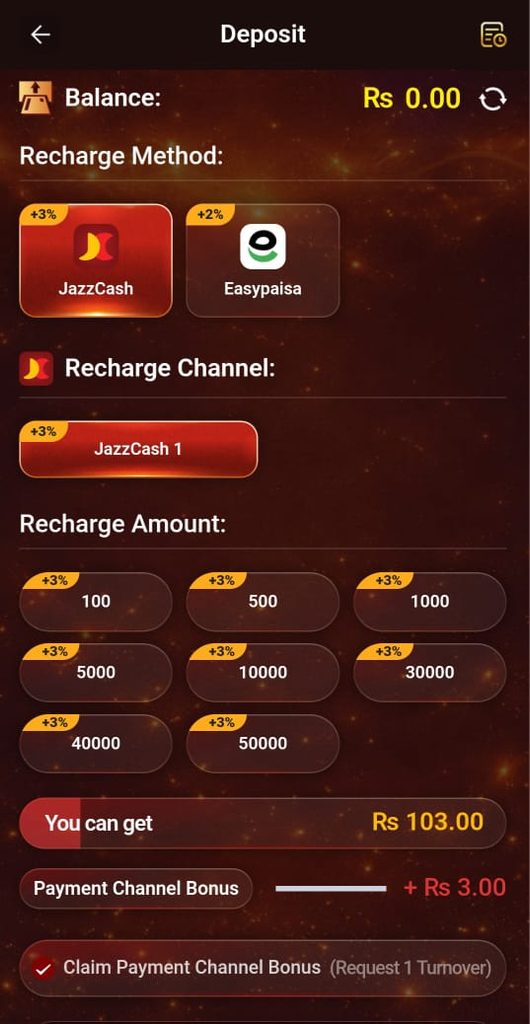
How to Deposit Money on 999nb game Using JazzCash and Easypaisa
The 999nb deposit section displays different payment options for users who want to add funds to their accounts. The screenshot shows JazzCash and Easypaisa as available recharge methods.
Users can explore the displayed payment options and select an amount according to their requirements.
Understanding the 999nb User Interface
A clear interface can make a gaming application easier to use, especially for people who are unfamiliar with new platforms.
When opening 999nb, take some time to explore its available menus and sections.
Pay attention to:
- Main dashboard and navigation.
- Available game categories.
- Account settings.
- Application information.
- Help and support options.
- Privacy and security settings.
Understanding these sections before starting can help you navigate the application more comfortably.
999nb Game Categories
Game selection is one of the main factors users consider when exploring a mobile gaming platform.
The available categories should be checked directly within the latest application version.
Before starting any game, read its instructions and understand its rules, requirements, and any applicable costs.
Do not assume that every game category mentioned on third-party websites is available in the current 999nb release.
999nb game Security and Privacy Considerations
Security is an important part of using any new Android application. Before installing 999nb, users should take a few precautions to protect their devices and personal information.
Verify the Download Source
Check whether the website or distribution channel is genuinely associated with the application developer. Avoid unfamiliar websites that provide modified or unverified APK files.
Review Application Permissions
Android displays the permissions requested by applications. Review each request and consider whether it is necessary for the application’s stated functions.
Be cautious if an application requests access to information or device features that appear unrelated to its purpose.
Read the Privacy Policy
If a privacy policy is available, review how the application handles personal information, device data, analytics, and third-party sharing.
Also check whether the developer explains account deletion and data retention.
Protect Your Account
Use a strong, unique password and never share your login credentials or verification codes.
Keep Android Updated
Install security updates provided by your device manufacturer and keep built-in security protections enabled.
These precautions are useful when evaluating 999nb and other unfamiliar mobile applications.
Common 999nb game Problems and Their Solutions
Like other mobile applications, 999nb may experience technical issues depending on the device, internet connection, and software version.
Here are some common problems and possible solutions.
999nb game Is Not Installing
If the APK does not install, check the following:
- Available phone storage.
- Android version compatibility.
- APK file integrity.
- Existing application versions.
- Installation restrictions.
If the file appears incomplete, delete it and obtain a verified copy.
999nb game Keeps Crashing
Unexpected crashes can occur because of software bugs, insufficient memory, or compatibility problems.
Try restarting your phone, closing background applications, and checking for available updates.
999nb Is Not Loading
Start by checking your internet connection. You can switch between Wi-Fi and mobile data to see whether the issue continues.
If other applications work normally, the problem may be related to the application’s service or server.
999nb Login Is Not Working
Double-check your registered account details. If you have forgotten your password, use the official recovery method if one is available.
Avoid entering your credentials on unofficial websites.
999nb APK Is Not Opening
An incomplete download or incompatible file may prevent an APK from opening.
Check the file details, Android requirements, and download source before trying again.
How to Update 999nb
Keeping an application updated can help improve compatibility, performance, and security.
If the developer provides an official update, check the version information before installing it.
For manual APK updates:
- Check the latest available version.
- Verify the download source.
- Confirm compatibility with your Android device.
- Download the updated APK.
- Follow the installation instructions.
- Open the application and check whether it works correctly.
Avoid downloading updates from random links shared through unknown websites or social media accounts.
How to Uninstall 999nb Game
If you no longer want to use the application, you can remove it through your Android settings.
Follow these steps:
- Open your phone’s Settings.
- Select Apps or Application Management.
- Find 999nb in the installed applications list.
- Open its application information.
- Select Uninstall.
- Confirm your choice.
Keep in mind that uninstalling an application does not automatically delete an account or information stored on the developer’s servers.
If you want your account deleted, check whether the application provides a separate account deletion option.
999nb Game Customer Support
Customer support is useful when users experience installation, login, or account-related problems.
Check whether the application provides verified support channels, such as:
- An in-app help section.
- An official website.
- A support email address.
- A contact form.
- An FAQ section.
Be careful when contacting unofficial support accounts. Never provide your password or private verification code to anyone claiming to represent the application.
Tips for a Better Android 999nb Game Experience
A few simple practices can help improve the performance of mobile gaming applications.
- Keep enough free storage on your device.
- Use a stable internet connection.
- Close unnecessary background applications.
- Keep your Android software updated.
- Install verified application updates.
- Read the instructions before starting a game.
- Avoid modified APK files.
- Take regular breaks while gaming.
These habits can help reduce common technical issues and encourage responsible application use.
Frequently Asked Questions About 999nb
1. What is the 999nb Gaming App?
999nb is an Android gaming application that users are exploring as a mobile entertainment platform. Its available features should be verified through the current application version.
2. Is 999nb available for Android?
The platform is discussed primarily as an Android application. Check the latest version requirements to confirm whether your smartphone is supported.
3. What is 999nb APK?
An APK is an Android application package used to install software on compatible Android devices. If 999nb offers APK distribution, users should verify the file before installing it.
4. How can I download 999nb?
Check for a verified distribution source associated with the application developer. Review the version and compatibility information before downloading.
5. Does 999nb require registration?
Registration requirements depend on the application’s current version and available features. Check the registration section within the application for accurate information.
6. Why is 999nb not installing?
Common reasons include insufficient storage, an incompatible Android version, a damaged APK file, or installation restrictions.
7. Why does 999nb keep crashing?
Possible causes include outdated software, compatibility issues, insufficient memory, or application bugs.
8. Can I update 999nb?
If an official update is available, follow the developer’s recommended update process. Always verify the source before installing a new APK.
9. Is 999nb safe to use?
Safety cannot be confirmed without independently verifying the application. Check its developer, download source, permissions, privacy policy, and available security information before installation.
10. How can I delete my 999nb account?
If an account deletion option is available, follow the instructions provided by the application or its verified support channel. Uninstalling the application alone may not delete your account.
11. Does 999nb work without an internet connection?
Offline availability depends on the individual games and application features. Some functions may require an active internet connection.
12. How can I contact 999nb support?
Look for verified contact information within the application or on the developer’s official website, if available.
Final Thoughts on 999nb Game App
999nb Game Application has become a subject of interest amongst Android users who are curious about trying out different gaming apps on their mobile devices. Before downloading any newly launched app, it is always advisable to gain knowledge about the features of the application, accounts required, compatibility and security issues of the software.
This article will serve as a guide to learn about 999nb game, its installation procedure on the Android device, account setup process, and other common issues that may arise.
Please note that features and installation of the application might vary in future due to updates.
Be sure to check all the necessary information from credible resources in order to make an informed decision regarding the use of 999nb game application.
Download links
How to install 999nb Game APK Download (Latest V2026 for Android) APK?
1. Tap the downloaded 999nb Game APK Download (Latest V2026 for Android) APK file.
2. Touch install.
3. Follow the steps on the screen.